Recommended Set Up: 1.) How to Add an Exchange
Prerequisites:
- Sign into your exchange account.
- Navigate to "Add API Key" in your exchange account settings.
- Set API Key permissions:

- Add the applicable Arrel DAPL IP Address: 35.233.126.155.
- ⚠ Important: Save your API Key & Secret, as you’ll need them for DAPL.
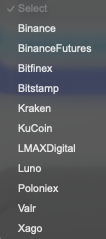
- Ensure your exchange is listed in the DAPL integrated exchanges dropdown.
Steps to Add an Exchange on DAPL:
- Sign into your DAPL account.
- Click the profile icon (top right corner) and select "Integrations."
- Navigate to: https://portal.arreltech.com/integrations.
- Click the "EXCHANGES" tab and then "Add API Key." as shown below:
- Once selected the following pop-up will appear:
- Select your exchange from the dropdown list.
- 📝 Note: Each exchange has specific requirements.
- 📝 Note: Each exchange has specific requirements.
- Enter your API Key & Secret in the respective fields.
- Ensure "Enabled" is selected.
- Review and set API permissions as needed:
- Most common settings allow trading & withdrawals, with whitelisted withdrawal addresses for security.
- Most common settings allow trading & withdrawals, with whitelisted withdrawal addresses for security.
- Click "Add New Exchange."
✅ Once added, your exchange and its API Key status will be visible in your DAPL profile.